

PHP 8.4 and 8.5 are here. Is your website running the right version?
Most people who run a website have never thought about PHP, and that's exactly how it should be.
PHP is the software working behind the scenes on roughly 70% of the web. It's what lets WordPress load a page, pull a blog post from a database, or process a contact form. You don't see it. You just see your site working.
But the version of PHP your site runs affects two important things: how fast your pages load and how secure your website is.
Here's what's new: PHP 8.4 and 8.5 are now available on Web Hosting, Hosting for WordPress and Reseller accounts, bringing performance improvements, security updates, and new features. We're also making 8.4 the new default. It's a good time to check: is your website running the right PHP version?
What's changing?
At WHC, we're making two updates to give you access to the latest PHP versions while keeping you in control of your website.
- First, PHP 8.4 and 8.5 are both available now. You can select either one from your control panel whenever you're ready.
- Second, PHP 8.4 is becoming the default for Web Hosting and Reseller accounts. New sites will start on it automatically.
If you already have a website with us, don't worry: your current PHP version won't change automatically. If your site runs 8.1 or 8.2 today, it will keep running that version until you decide to switch. You choose when to make the change.
There's nothing you need to do right away. The newer versions are available when you're ready.
Why running an old PHP version can be a problem
Here's the thing about PHP versions: an outdated one doesn't necessarily cause problems right away. But over time, it can affect your site's security and performance.
Two things happen as a version gets older.
First, it stops getting security updates. PHP 8.1 reached its end of life in December 2025. PHP 8.2 is now receiving security updates only. Once a version is no longer supported, newly discovered security issues won't be fixed by the PHP development team.
Second, it falls behind on speed. Newer PHP versions generally bring performance improvements that can help your pages load faster. And a faster website means a better experience for visitors, with potential benefits for your search rankings too.
An older PHP version might work perfectly fine today, but over time, it can become slower, less secure, and less compatible with newer plugins and tools.
Updating helps keep your website running smoothly and securely.
What's new in PHP 8.4 and 8.5?
Both versions bring improvements to PHP, from better performance to new features that make development easier.
- Performance improvements: PHP 8.4 includes optimizations that can help websites run more efficiently. PHP 8.5 also introduces improvements to how certain operations are handled. The actual speed gains depend on your website and its setup.
- Ongoing security updates: Both versions are actively supported, giving you access to security fixes and longer-term support than older PHP releases.
- New tools for developers: PHP 8.4 makes it easier to manage code and work with web pages. PHP 8.5 adds features that simplify working with URLs and help developers write cleaner code.
For most website owners, the biggest benefit is keeping their site up to date and ready for future improvements. Developers can also take advantage of the new features.
Want to explore the technical details? Check out the official release announcements for PHP 8.4 and PHP 8.5.
PHP 8.4 or 8.5: which one should you choose?
Both are available. Here's how to decide.
Choose PHP 8.4 if you run WordPress or rely on plugins and themes. It's the best choice for most websites right now: fast, secure, supported with security updates into 2028, and compatible with a wide range of WordPress plugins and themes. That's why we're making it the default.
Choose PHP 8.5 if you want the latest version and know your website is compatible. It's the newest PHP release, with the latest performance improvements and features. It's a good option for developers and anyone running a custom website that's ready for it.
If you're not sure, PHP 8.4 is our recommendation for most websites.
How to switch your PHP version in a few clicks
You can change your PHP version directly from cPanel. It only takes a minute, and the change applies immediately.
Here's how:
- Log in to your Client Area
- Open cPanel.
- Under Software, click Select PHP Version.
- From the PHP version dropdown, choose PHP 8.4 or 8.5.
- Click Apply to save your changes.
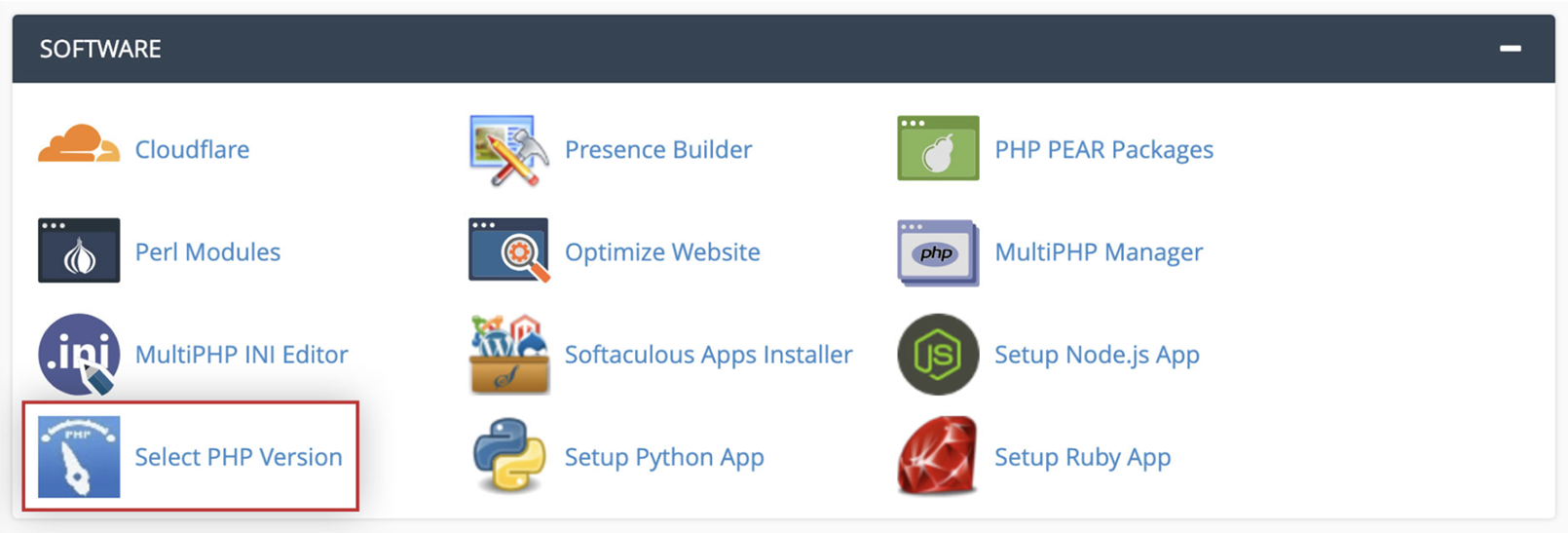
Your website will start using the selected PHP version right away.
One tip: After switching, take a few minutes to test your website. Open a few pages, submit a contact form, and check your checkout if you have one. Older plugins, themes, or custom features may not always work with newer PHP versions.
If something isn't working properly, you can switch back to your previous PHP version using the same steps.
For more detailed instructions, check out our Help Centre guide on changing your PHP version.
"But my PHP version looks older than I expected"
That's normal, and there's a good reason for it.
The version number alone doesn't always tell you whether your website is protected. At WHC, our HardenedPHP technology allows us to apply security fixes to older PHP versions without necessarily changing the version number you see.
That means your website can still receive important security patches even if it's running an older PHP version.
We recently covered this in our article about the recent article about the PHP2Shell security vulnerability and the steps WHC took to protect hosted websites.
The important distinction: Having the latest PHP version and having the latest security patches aren't necessarily the same thing. HardenedPHP helps protect websites running older versions, while upgrading to PHP 8.4 or 8.5 gives you access to newer features, performance improvements, and longer-term support.
Why we handle PHP updates this way
We could automatically move every website to the newest PHP version, but we don't. And there's a good reason for that.
Updating PHP can occasionally cause compatibility issues with older plugins, themes, or custom code. We want you to have control over when you make that change, so you can test your website and make sure everything works as expected.
That's why we make the latest versions available, set a recommended default for new websites, and let existing customers choose when to upgrade.
Meanwhile, we continue to manage security updates behind the scenes to help keep your website protected.
We've been helping Canadians keep their websites online since 2003, and making updates easier and safer is part of that commitment.
Frequently Asked Questions
What is the latest version of PHP?
PHP 8.5 is the latest release, available now on WHC. PHP 8.4 is our recommended version for most websites and is becoming the default for new Web Hosting and Reseller accounts.
Do I have to update my PHP version?
No. Your website will keep running its current version until you choose to switch. We recommend upgrading to PHP 8.4 or 8.5 for better performance and longer-term security support, but you can decide when to make the change.
Should I choose PHP 8.4 or 8.5?
For most websites, especially WordPress sites, PHP 8.4 is the best choice. It's fast, secure, widely compatible, and supported with security updates into 2028. Choose PHP 8.5 if you want the latest release and your website and its components are compatible.
Is PHP 8.1 still safe to use?
PHP 8.1 reached its end of life in December 2025 and no longer receives security updates from the PHP development team. At WHC, HardenedPHP provides additional security patches for older versions, but we still recommend moving to a supported version like PHP 8.4 for better performance and long-term support.
How do I change my PHP version?
Log in to cPanel and go to Software → Select PHP Version. Choose your preferred version from the dropdown and click Apply. Test your website afterward to make sure everything works properly. You can switch back to your previous version if needed.
 About the author: Marie-Eve Petit
Marie-Eve is WHC’s Marketing & Communications Manager and an unapologetic word nerd. Passionate about tech, music, and the power of punctuation, she thrives on helping Canadians succeed online and making an impact at WHC. When she’s not at work, you’ll find her enjoying a spritz on a terrace somewhere, lost in her garden, or maintaining her undefeated Scrabble streak (since 1998!).
See all articles from this author Interested in writing for Web Hosting Canada?
Also on the WHC Blog
What is a web app?
A web app, short for web application, is a tool that runs in your browser. Think of it as a website, just a little fancier. Instead of only presenting information for you to read, a web app lets you do something: book an...
Read full article
10 web hosting questions people keep asking, answered honestly
Finding the right hosting for your website or project shouldn't eat your whole weekend. Most of it comes down to a few real questions, the same ones that come up over and over here and in other hosting threads. Here are straight...
Read full article
