Archives

cPanel on iPhone: Hosting Management on the Move

As of 2019, cPanel appears to have discontinued the iPhone and Android cPanel App support. The content of this article may no longer be accurate.
Don’t wait till you get to a computer to modify your website, emails or database. Just grab your iPhone and use the cPanel iPhone app! The app is free, lightweight and simple so why not give it a try?

cPanel iPhone app: What does it do?

The app allows users to easily access the three core cPanel services: cPanel, Webmail and WHM. This means that the app works not only for cPanel account owners but also for reseller and server administrators. With the cPanel iPhone App you’ll be able to quickly
  • Manage your account’s files with the File Manager
  • Read & Manage your emails with Webmail
  • Manage databases, redirects, forwarding, auto-replies, and more
  • For resellers: manage your client accounts through WHM
...all this while on the move, from your iPhone or iPad!

Why the cPanel app and iPhone make a great team

The cPanel iPhone App is both convenient and secure. Latest generation iPhones have useful security features that make it hard for unwanted people to log into your device. The most notable being facial recognition and touch ID (fingerprint scans) protection. The cPanel App makes use of the iPhone's security features by securely saving a long and complex password within your App, then enabling access through a touch of your finger (you won’t need to remember your password). If an intruder got hold of your iPhone, they would not be able to access your cPanel account through the app without your face or fingerprint.

cPanel app for android

The cPanel Android app has also been available for some time. Unlike the iPhone App, the Android app does not offer facial recognition or touch ID. It does offer password, PIN-code (numeric password) and pattern protection (a particular pattern you trace with your finger) but these are generally considered to be less secure.

How to use the cPanel iPhone App

Download the iPhone or Android app on your device, open it, then click + to add a new connection. Now enter:
  • Name: any name of your choosing for you to remember this connection by
  • Address: Usually your domain name (or server name for Cloud or Dedicated servers)
  • Service: choose between cPanel, Webmail or (for resellers or server managers) WHM.
  • Enter your Authentication details:
    • Username & Password: Provided when you opened your account (or created your email, if Webmail). Can be found and changed from your Client Area.
    • TouchID: allows you to connect with your fingerprint rather than your password, so we recommend you leave this on.

Happy hosting with your new mobile App!

Critical Drupal Vulnerabilities Announced: Update Now.

A critical vulnerability is being exploited in Drupal, a popular Content Management System (CMS), since April 2018. If you run a Drupal website, please update it immediately.

About Drupal’s Critical Vulnerabilities: CVE-2018-7602 and CVE-2018-7600

Both vulnerabilities are rated Highly Critical. Hackers can exploit these vulnerabilities to gain complete access to your website and hosting account. All modern versions of Drupal are affected including Drupal 6, 7 and 8.

Information about both vulnerabilities are available on Drupal's website:

CVE-2018-7602
CVE-2018-7600

How can I secure my Drupal website?

Please update your Drupal installation to the latest available version. The upgrade process may depend on your current Drupal version and may require a developer's or technician's intervention.

Before You Update

Always back up your current installation, including files and database, before any important update.

What else can I do to protect myself?

Drupal reports that "this vulnerability [CVE-2018-7602] is being exploited in the wild." which means that there are known cases of this vulnerability having been already exploited in production environments by hackers. This is worrying as your website could potentially be compromised without any obvious signs. More worrisome is that hackers often wait up to a year to activate the malicious code so that patches and backups are limited in their effectiveness.

WHC's SiteSafe Protection service can be used to perform a deep scan to identify any compromised installations and clean them, as well as identify hidden vulnerabilities. To facilitate and encourage its adoption, Web Hosting Canada users can benefit from a 20% discount on SiteSafe Protection this month. Use the code DRUPALSITESAFE20 when ordering to automatically receive the discount.

Stay Safe, The Team at WHC

Show Off the .PRO that You Are!

There are hundreds of Top Level Domains to choose from, but which one is right for you? This month's featured domain is .PRO! A domain extension that says a lot with only three little letters.

.PRO Domain names

You need to show prospective clients that you are an expert in your field. A .PRO domain name lets them know that they've found the skills and experience they were looking for. A .PRO domain name is:
  • Great for PROfessionals in any industry
  • Ideal for websites targeting or discussing a PROfession
  • Bilingual, used frequently in both French and English, making it a good choice for businesses operating in Canada
Consider giving your online business a boost with .PRO! For a limited time, register a new .PRO domain for only $7.99 for the year. Because everyone prefers to work with a PRO!

Domain Name Slamming: Protect Yourself

As we’ve explored in our previous article about new privacy regulations coming into force in Europe, security concerns are growing around the world. Closer to home, scams involving domain names are not new, but have been increasing at an alarming rate. As a domain owner, you may have already come across some of these scams, commonly referred to as Domain Name Slamming.

The Fake Bill Scam

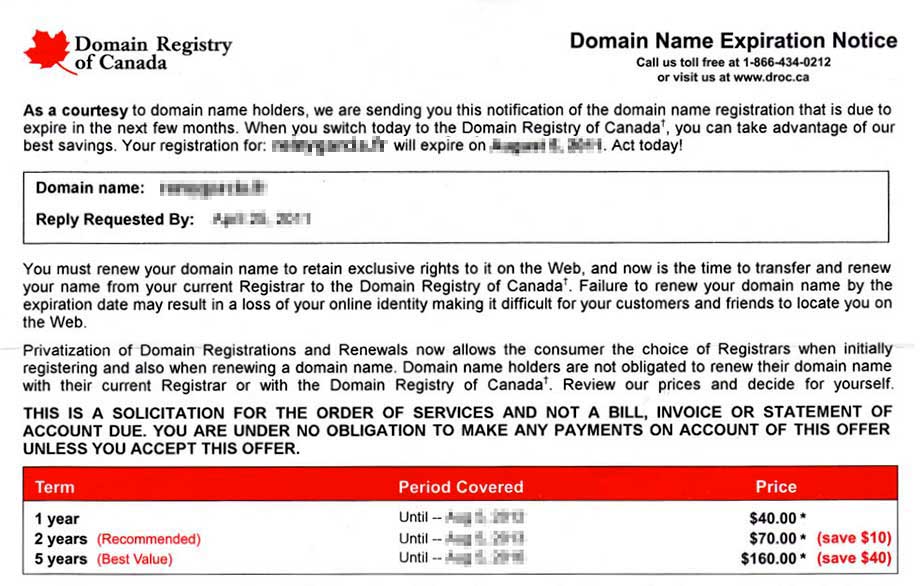
Domain Registry of Canada, or DROC, has been operating for years, confusing Canadians with what looks like a renewal bill for your domain names. This scam is the most popular version of ‘domain name slamming’, a type of con that focuses on overcharging or falsely charging domain name owners. The ploy: The letter begins by informing you that your domain name(s) will be expiring in the near future. It continues with a list of prices for renewal over different time periods and ends with a tear-away payment stub to ‘renew’ your domains. Domain Registry of Canada Scam The message: Though the letter looks and feels like a bill, closer inspections shows that DROC is actually asking you to change the company you register your domains with but buries that information among statements like, “Failure to renew your domain name by the expiration date may result in a loss of your online identity”. These tactics give a sense of urgency, confusing individuals into paying up to 3 times the price of a standard domain renewal. Clients that get baited by the offer may also end up losing access to their websites and emails for prolonged periods of time. Variations: Over the years, DROC has gone under many other names to continue their shady practices: Regardless of name and flavor, they all follow a similar practice of mass mailing unsuspecting domain owners. The templates and logos may vary slightly, but the principle remains the same. Interesting fact: CIRA has been working diligently since 2011 to decertify and halt this provider’s dubious practices. A detailed affidavit describing this process is available online. UPDATE: We attempted to contact DROC for a comment, but our efforts failed as the phone service only directed us to leave a message on a voicemail system that – surprise, surprise – was already full.
Fear the Competition Scam

These scams also rely on a sense of urgency combined with a fear of losing out to the competition. The ploy: Generally sent through email, these types of scams are not looking for you to transfer your domain name but to purchase the same domain with a different extension. They usually imply that your domain name ownership is under question (this is generally not the case), and “conveniently” recommend that you pay for the new registration yourself to protect your brand and copyright abroad. These scams are designed to scare people into paying rather than spending time and resources on a ‘legal matter’ involving international law.
Dear CEO, We are a Network Service Company which is the domain name registration center in China. We Received an application from Hualong Ltd on (date). They want to register “(yourdomainname)” as their internet keyword and “(yourdomainname).com.cn” “(yourdomainname).net.cn” “(yourdomainname).org.cn” “(yourdomainname).asia” “(yourdomainname).cn” But after checking it, we find “(yourdomainname)” conflicts with your company. In order to deal with this matter better, so we send you email and confirm whether this company is your distributor or business partner in China or not. Best Regards, (The Scammer) / Service and oporations manager
The message: Seemingly written by a company in China, the email warns you that a there is a mysterious competitor that is trying to purchase a variation of a domain name that you own, usually with a different extension, such as .com.cn. As there is a potential copyright conflict, you will be given the option to contest their registration and secure the domain yourself before the competition. Variations: These scams come in many different ‘styles’. Here is a list of some of the ‘businesses’ that have been documented as fear the competition domain slammers.

How do These Companies Obtain my Information?

The WHOIS database is a massive collection of information on who owns most domain names, including detailed contact information of its owners and administrators. Since it’s a public database, certain dubious companies have unfortunately made it their business to scrape its data and store the information they need to solicit unsuspecting domain name owners. Luckily, there are ways to protect yourself.

How Can I Protect Myself from Domain Slamming?

There are three main ways to safeguard your interests against domain slamming.
  1. Activate Privacy protection to shield your personal information on the WHOIS, making it inaccessible to spammers and scammers. Individuals registering .CA domains receive this protection by default, for free.
  2. Be vigilant and trust your instinct. If it sounds fishy, it likely is! Read through the content diligently and if in doubt try to Google search the company’s name or email address. If the results involve a lot of talk of scams, it’s a scam.
  3. When you receive a scam email, mark it as spam in your inbox and forward it to [email protected]. This will train antispam filters and reduce the number of messages of this type in the future.
If you receive a scam email or letter, or have been the victim of one of these scams, remember you are not alone! Canada has an Anti-Fraud Center which you can contact as well as Canadian Anti-Spam Legislation (CASL) where you can report email scams.

Share Your Story

Have you come across or fell victim to other scams connected to web hosting or domains? Comment below to help fellow Canadians avoid being conned online!


Get Your Clips Online with a .VIDEO Domain

This month's feature domain is .VIDEO! A domain extension that lets visitors know that your website will entertain and/or inform with clips or media content.

.VIDEO Domain names

Whether your video recording instrument of choice is a top-of-the-line high resolution camera or a simple smartphone, videographers are churning out video clips at a record pace. Why not find them an online home? A .VIDEO domain can be a great fit for:
  • tutorials and information-based websites
  • Youtubers looking to take the next step, such as having members only videos or selling merchandise
  • Professional videographers or cameramen showcasing their services or sharing their works with clients
  • Bilingual, used frequently in both French and English, making it a good choice for businesses operating in Canada
Get people clicking with your own .VIDEO domain. For a limited time, register a new .VIDEO domain for only $11.99 for the year!