Archives

Business Networking

How to optimize business networking

The mere mention of the word "networking" can be intimidating, especially for introverts, but is it really as stressful as it sounds? Let's take a look at the best practices for stress-free business networking!

What exactly is networking?

Networking is a face-to-face or online event that enables you to create and maintain professional or personal relationships with other people, with the aim of exchanging information and developing connections. Business networking is the best-known form of networking, but there’s also social or romantic networking.

Types of networking

Formal networking

Formal networking is characterized by organized, structured, face-to-face events. This is the classic type of networking organized by Chambers of Commerce, conferences and seminars. This is a targeted and effective approach to networking.

Informal networking

Informal networking takes place in less structured settings, such as social gatherings, sporting events, coworking spaces and so on. Links are forged over time in a much more natural way, without professional pressure.

Online networking

Online networking, meanwhile, is just a click away! Relationships are forged through a presence on digital platforms like LinkedIn or Facebook, for example. It's possible to connect with people from all over the world, which can be attractive to those who offer extended services without any geographical constraints. More introverted people particularly appreciate this type of networking.

The benefits of networking

Participating in networking events brings many benefits: you'll have access to information and resources that are exclusive to networking participants, all while increasing your visibility and building your professional reputation.

Best practices for smart, profitable networking

How to prepare

To optimize your networking experience, thorough preparation is essential. Here are a few things to think about:

  • Start by defining a clear objective. For example, you might want to talk to one person in particular or make contact with three prominent people during the event. Setting an objective will help you stay focused and maximize your time.
  • Prepare a short sales pitch and practice it! However, avoid rigid presentations that may come off as forced and unnatural. Settle your 2-3 main points, but otherwise adapt to whoever is in front of you. The important thing is to clearly explain what you do, why you do it and how you can help the person.
  • Arrive at the event early so that you can meet more participants in a less crowded setting, thereby facilitating your interactions. If possible, find out in advance who will be in attendance. In this way, you can channel your energy towards essential interactions with key people.

Building an offline network

Participating in face-to-face networking events will certainly require a proactive approach. The first step is to identify places to network. Here are a few examples of networking events you could attend:

  • Networking events organized by local Chambers of Commerce, business associations, etc.
  • Training courses and conferences of all kinds often include a cocktail and networking period. It's the perfect time to meet new people!
  • Professional associations, entrepreneurial networks, and networking groups such as BNI are also worth joining.

When networking, don't hesitate to ask questions and, above all, listen to the answers you get. People respond well when you show interest. Listening is an important skill. By being present and listening carefully, you'll better understand people’s needs and how to meet them.

When you talk about yourself, keep it short and concise: no one wants to listen to a self-involved, 30-minute rant. Above all, be yourself while avoiding main character syndrome.

After an event, follow up with the people you meet. Ideally, connect with them on networks like LinkedIn or use a CRM.

CRM (Customer Relationship Management): a software tool for managing and organizing interactions and relationships with customers or business contacts.

What about business cards? They're less prevalent these days. A good, up-to-date LinkedIn profile will do. Speaking of which, did you know that you can connect to someone on LinkedIn simply by using the QR Code associated with your profile?

Developing an online network

We're all familiar with face-to-face networking, but one mustn't underestimate the power of online networking, particularly through the use of social networks.

  • Target the platforms or communities most relevant to you.
  • Stay active in Facebook groups related to your field of activity.
  • Maximize your use of LinkedIn: it's the ideal network for sharing content and making connections.
  • Participate in discussions, comment on other people's publications, reply to comments you receive, etc.

There are also virtual networking events you can attend from the comfort of your own home. Do you have a creative streak and like to take charge? Why not organize your own virtual networking event?

Maintaining your network

Once you've created a network, it's important to know how to maintain it. Start by connecting online with the people you meet at events. LinkedIn is ideal for this, enabling you to maintain relationships and track your contacts’ progress. Beyond that, don't hesitate to check in with your contacts on a regular basis: this will show your interest in them, and you won’t likely be forgotten. Finally, stay proactive by putting members of your network in touch with each other. For example, if someone is looking for a professional in a specific field, don't hesitate to recommend the appropriate contact. Then, let the people referred know that you've recommended them, reinforcing your presence in their minds and strengthening the professional bond.

From networking to business growth

First of all, just because you meet someone while networking doesn't mean they'll sign a contract with you. Nevertheless, there are several strategies you can follow to make networking work for you and your business.

When you talk to someone at a networking event, ask yourself if they represent a sales or partnership/collaboration opportunity. They may not be either at present, but you never know when that might change.

Furthermore, investing in a relationship that isn't a client or partner can help you generate opportunities:

  • Ask the person if they know a professional in a particular field; this reference could become a potential customer.
  • Invite the person to become an ambassador for your company. You could even offer a referral program for people who bring you new customers.
  • Go networking together. Not only will this give you a new person to go to events with, but it will also allow you to meet more people and set up mutual contacts.

Networking in a nutshell

Business networking, although intimidating for some, has proven to be a powerful tool for broadening professional horizons and developing rewarding opportunities. By understanding and applying different networking techniques, whether in formal, informal or online settings, you can cultivate valuable, lasting relationships.

With a proactive approach and targeted practices, your network will become a real driver for your business. So dive in and turn every meeting into a new opportunity for collaboration and success!


Not sure how to find networking events? Ask your local Chamber of Commerce, join a BNI or take advantage of LinkedIn Local.

Artificial Intelligence Policy

WordCamp Canada 2024

Join WHC @ WordCamp Canada

Exciting news! WHC is heading to WordCamp Canada, and we’re bringing our A-game. This WordPress-focus event will be held from July 11 to 13 in beautiful Ottawa. As proud sponsors, speakers, and panelists, we’re ready for an event packed with insights and innovations. 

If you can't make it, follow us on social for live updates from WordCamp Canada ( WCEH ! ) and a sneak peek at our AI-powered WordPress solution, programmed to impress!

WHC sponsors WordCamp Canada 2024

After a fantastic first WordCamp experience in 2019, in our hometown of Montreal, we’re stepping up our game and going national! WordCamp Canada is a key event for the Canadian WordPress community, and WHC is thrilled to be an official sponsor again this year. 

WordCamp is all about WordPress.

WordCamp events are community-driven conferences organized by and for the WordPress community that happen worldwide. The latest one in Turin was a big hit. Tickets for the first-ever WordCamp Canada are just $75 for the three-day event—a great chance to learn, network, and enjoy insightful sessions in Ottawa.

Save the date

What: WordCamp Canada 2024

When: July 11-13, 2024

Where: Infinity Convention Center, 2901 Gibford Drive, Ottawa, K1V 2L9

If you’re a seasoned developer, join Contributor Day, or if you’re a newbie, take the Intro to WordPress, or pass by and get help for anything WordPress at the 'Happiness Bar'. Check the official schedule and grab your tickets now!

Come meet the WHC team

If you’re attending WordCamp Canada, stop by the WHC booth to chat with our friendly team: Emil, CEO and founder; Frank, Chief Domain Nerd; Anne-Claude, Marketing and Sales Director; and many other WHC’ers. Whether you have questions or just want to geek out, we’re excited to connect with fellow WordPress enthusiasts!

WHC’s Commitment to WordPress and Web Accessibility

WHC ❤ WordPress

Supporting the WordPress community is at the heart of what we do. We’ve joined numerous WordPress events and meet-ups over the years. WordCamp is the best opportunity to be an integral part of the WordPress community.

WHC is committed to Web Accessibility

We recently improved our Client Area to make it more accessible for users. Today, we’re proud to say that it meets WCAG Level AA standards. We’re hard at work to make our entire website equally accessible. Our efforts, led by our in-house expert Mike, are in line with our mission of helping every Canadian succeed online. And we want to make sure no one is left out. 

Let’s talk about Web Accessibility 

Join the conversation, on July 13 as WHC takes the stage in a dedicated panel about the growing importance of making all websites, apps, and the Internet accessible to everyone. 

Here’s who you can catch on stage:

  • Emil Falcon, CEO and Founder of WHC, will lead and moderate the panel on web accessibility, discussing the significant strides WHC has made to enhance our website and client area for users with disabilities.
  • Michel-Anthony Borde, Web Accessibility Expert at WHC, will share his experience and insights of working in tech as a person who’s blind. Mike is also an actor and entrepreneur. 

Discover the Future: AI + WordPress

The future of WordPress at WHC has AI written all over it. And it’s being unveiled at WordCamp Canada. Don’t miss the launch of our groundbreaking AI-powered WordPress solution, a Canadian first. Witness it firsthand: Visit our booth for an exclusive first look. Test it yourself and see how it transforms the WordPress experience.

Join us

We can’t wait to see you at WordCamp Canada 2024. Be part of something big and participate in insightful sessions, exciting reveals, and get the opportunity to connect with the vibrant WordPress community. 

Be sure to follow us on social for live coverage of the event and don’t miss our big launch, a Canadian exclusive: The future of WordPress has AI written all over it!

Refer a Friend

Get free hosting when you refer a friend!

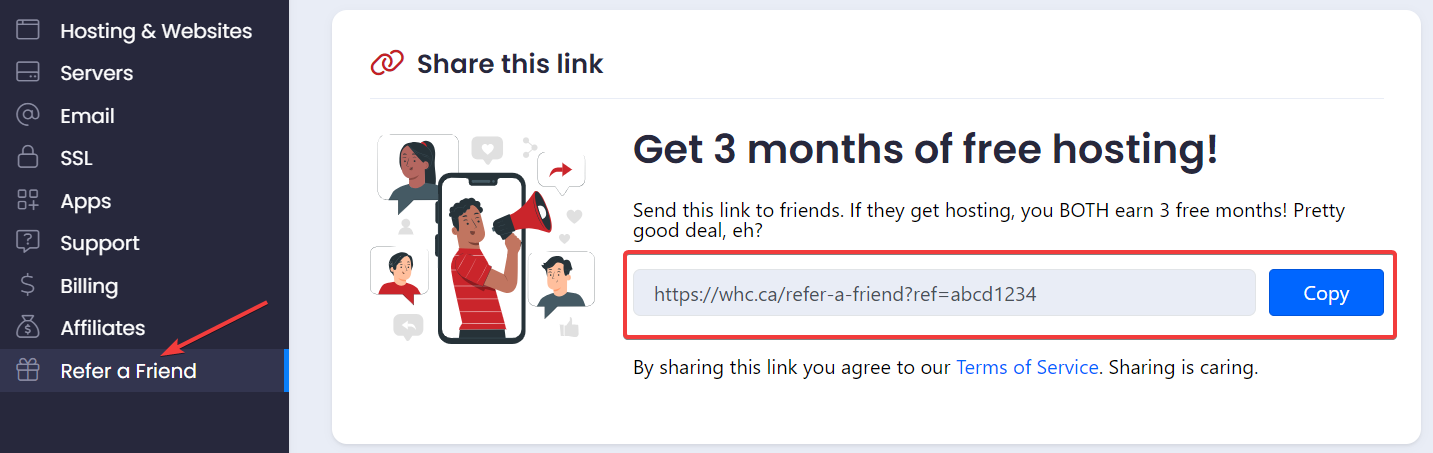
Do you believe sharing is caring? We at WHC certainly do. This is why we’re thrilled to launch our new reward program: Refer-a-Friend! 

If you enjoy WHC’s Canadian hosting services, why not share the love with your friends, family or colleagues? For every successful referral to WHC, both you and your friend get an extra 3 months of free hosting. It’s a win-win! 🥳

It’s our way to thank you for spreading the word about WHC. Let's dive in.

What’s the Refer-a-Friend program at WHC?

The Refer-a-Friend program is as easy as 1-2-3, designed for you to earn rewards (free web hosting!) while helping your friends find reliable web hosting. Here’s how to get started:

It’s simple and rewarding:

  1. Log into your WHC Client Area
  2. Grab your unique link from the Refer a Friend section Refer a friend UI
  3. Share this link with anyone in need of top-notch Canadian hosting

Share and earn

Once you share your unique link, the perks can quickly start piling up! If your friends sign up for any yearly plan using your link and stay with us for at least 45 days, you both get three months of free hosting, automatically applied to your hosting service and added at the end of your billing cycle. It's our way of making sure your good deeds don’t go unrewarded.

Why refer friends to WHC? 

For over 20 years, WHC has defined excellence in Canadian web hosting with unmatched security and performance, backed by 24/7 bilingual technical support. We’re SOC2 compliant, powered by renewable energy, and committed to community and environmental sustainability. With a 93% satisfaction rate, choosing WHC means you're supporting a local company that cares deeply about its customers, people, and the planet.

Our commitment to you and your friends

At WHC, we see our customers and the people they refer to us as an integral part of a community. We’re deeply committed to providing exceptional service and support to help you and anyone you refer succeed online. 

Ready to start? 

If you’re ready to start sharing the best in Canadian web hosting, head over to your Client Area, grab your link, and start spreading the word. If you’d prefer earning cash instead of free months, you should consider becoming an affiliate.

Great hosting is better when shared with friends—and it doesn’t get much better than earning free months for you and your friend while you’re at it!

Accessibility

Improving Web Accessibility for Your WordPress Site

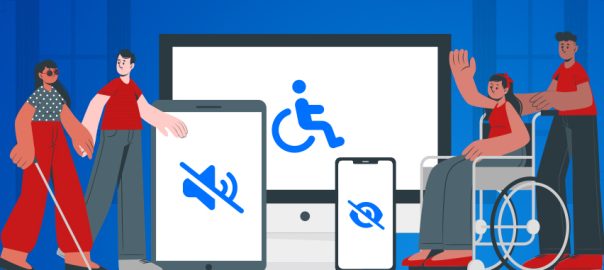
Have you checked your website's accessibility level lately? In today’s digital age, the web should be accessible to everyone. Web accessibility is an important aspect that’s too often overlooked, especially considering over 25% of Canadians aged 15 and older report at least one disability!

This article introduces web accessibility, underscores its importance, and serves as a guide to help you make your WordPress website accessible to everyone. Let’s dive in:

What is Web Accessibility?

Web accessibility is like hosting a party where everyone who’s invited can actually come and participate.

Essentially, Web Accessibility is the practice of making sure websites work for everyone, including people with disabilities. It’s about designing and creating sites that anyone can use, no matter how they interact with the web—like using a keyboard instead of a mouse or needing text to be read aloud because they can't see the screen well. It’s the process of eliminating barriers for anyone who wants to visit and interact with your website.

Why is Web Accessibility important?

Accessibility ensures ALL users, regardless of their abilities, can navigate, understand, and interact with the web. Moreover, an accessible website also,

  • Enhances your website’s user Experience (UX) across the board.
  • Increases reach and market penetration by making your content available to a wider audience.
  • Improves SEO rankings as search engines prioritize accessible websites.
  • Mitigates legal risks by complying with standards like the Accessible Canada Act.

Understanding W3C and WCAG

We now know the importance of making your website accessible and usable by everyone, including those with disabilities. But who sets those accessibility guidelines and standards? 

The role of W3C in Web Accessibility

The World Wide Web Consortium (W3C) plays a pivotal role in shaping the future of the web. This consortium gathers experts from around the world to develop protocols, standards and guidelines to ensure the web’s long-term growth. W3C plays a critical role in making the web open, functional, and accessible for everyone, including people with disabilities.

What is WCAG?

Developed by W3C, the Web Content Accessibility Guidelines (WCAG) are the cornerstone of web accessibility efforts worldwide. Think of it like the blueprint of inclusion on the web. Originating in 2008, these guidelines have evolved through several updates to accommodate a broader spectrum of disabilities:

  • WCAG 2.0: Introduced in 2008 as the initial web accessibility standards.
  • WCAG 2.1: Released in 2018 to cover a wider range of disability needs.
  • WCAG 2.2: Launched in 2023 to further refine accessibility guidelines.

Measuring accessibility with 3 conformance levels

The WCAG outlines 3 levels of accessibility conformance, ranging from basic accessibility features to the most stringent requirements.

  1. Level A: A website meets the basic web accessibility features
  2. Level AA: This is typically the standard required by laws and regulations worldwide. It means a website addresses the major requirements for disability access.
  3. Level AAA: This is the most stringent level, and it means a website meets the highest standard of web accessibility.

What is typically the standard here in Canada? Ideally, this is the standard recommended for a website. The Accessible Canada Act requires all organizations under federal jurisdiction including all federal departments and agencies to make their websites and digital content accessible at a Level AA. 

Applying the POUR principles

In order to simplify things, the W3C introduced the POUR principles, a framework that helps implement accessibility guidelines. Its acronym represents 4 key aspects of web accessibility:

Perceivable: All users should be able to access and understand your site's content, whether through sight, sound, or touch​​. Make sure to: 

  • Include captions in your videos and transcripts to audio files for deaf or hearing-impaired users.
  • Use alternative text (also called “alt tags”) for every image to help visually impaired users.

Operable: Your site should work for everyone, regardless of how they navigate it. Make sure to: 

  • Have multiple ways to interact with your website like using a keyboard instead of a mouse to scroll​.
  • Give clear instructions or error recovery options that can be controlled regardless of abilities.
  • Forget elements that require drag-and-drop interactions unless there is an accessible alternative.

Understandable: Your website and your content should be easy to navigate, read or understand. Everything from information to how the site works should be straightforward​. Make sure to:

  • Choose a language level that’s easy to read and understand (typically at an 8th-grade reading level if writing for the general public).
  • Include shorter supplements of information, such as TLDR summaries or excerpts before long articles or written descriptions for charts or graphs.
  • Select functions and elements that are easily understandable, by staying consistent with font styles, colors, and sizing across all pages of the site
  • Have an easy-to-navigate structure, clear instructions for forms and visible form labels, etc. 

Robust: Your site should work well with different technologies, including browsers and assistive tools​​. This means: 

  • Be able to function across many current and future devices, operating systems, and browsers.
  • Consider supporting some outdated operating systems and browser versions, as some users (especially those who use assistive technology) are less likely to be running the most up-to-date versions of their browser or operating system.
  • Test and validate against technical standards for applicable platforms.

WordPress and Web Accessibility

WordPress is a top choice for building accessible websites, thanks to its flexible architecture, built-in tools that comply with international standards and a robust team dedicated to keeping web inclusivity front and center. Whether you're just starting or looking to improve, WordPress offers tools and features that help ensure your site meets accessibility standards.

Choosing an accessibility-ready theme

Choosing the right WordPress theme is critical, as it forms the foundation of these accessibility features. There are a ton of accessibility-ready WordPress themes out there. These themes are built with accessibility in mind from the outset and make it significantly easier to achieve and maintain compliance with WCAG standards, ensuring your website is accessible to all users.

Leveraging accessibility plug-ins

You can easily enhance your website's accessibility by using plugins designed to improve various aspects such as:

  • UserWay: The world’s #1 website accessibility solution offers a variety of tools to improve accessibility features.
  • WP Accessibility Helper: Simplifies the management of common accessibility issues, such as font size adjustments and contrast settings.
  • A11y Color Contrast Accessibility Validator: Helps ensure that your site's color contrast meets the minimum requirements for readability.

Creating accessible content

Content matters. So it’s important to create content that everyone can enjoy:

  • Use Alt Text for every image to describe what the image shows. In WordPress, you can add this directly in the media uploader.
  • Structure your content with proper heading tags (H1, H2, H3) to organize and describe the main topics of a page.
  • Ensure all your videos have captions and all audio content has transcripts to accommodate users with hearing impairments.

Testing your website for Web Accessibility

Validating your site’s accessibility is crucial. The W3C offers a self-evaluation checklist for your website. You can also use AI-powered tools like AccessScan or AccessibilityChecker to analyze your site and follow the recommendations to make it more accessible. For users of chatGPT, Accessibility Testing GPT is a tool that scans a web page and identifies any issues.

Additionally, keep your WordPress and plugins updated. Updates often include improvements in accessibility features.

WHC’s Commitment to Web Accessibility

WHC is dedicated to making the web accessible. We recently made big improvements to our WHC Client Area, making sure it meets WCAG Level AA requirements. We're committed to keeping up this standard and are working to make all parts of our website just as accessible. Our goal is to help every Canadian succeed online, making sure no one is left out.

Conclusion: Take Action!

Accessibility isn't just a legal requirement—it's our promise to make the web a welcoming place for everyone. The team here believes in tearing down barriers and making the web more inclusive. Want to join in? Every change helps. So, start making small improvements to your website's accessibility today.